What Is Identity and Access Governance: A Practical Guide for SaaS Teams
Identity and access governance answers the question IAM doesn't: should this access exist at all? Here's what IAG covers in 2026, why it matters for security.

.svg)
Key Takeaways
- Identity access governance covers the gap left by IAM. Rather than answering, “Can this person log in?” identity access governance answers, “Should this access still exist, and is it appropriate for their current role?”
- Identity and access management governance covers four practical areas in SaaS environments. This includes user lifecycle management, access review and permissions oversight, centralized SaaS access control, and NHI identity and OAuth governance.
- Shadow AI is the fastest-growing governance gap in 2026. AI agents authorized via OAuth by individual employees carry real SaaS access and appear in no identity directory unless a governance tool surfaces them
- Effective governance doesn’t require enterprise IGA platforms. Teams on Google Workspace or Microsoft Entra ID can connect to Synk.to in under five minutes and immediately get visibility on orphaned accounts, over-permissive OAuth scopes, and ungoverned AI agents.
- The governance baseline that matters the most is having complete visibility and inventory of all identities, both human and NHIs, in an organization. Then there needs to be a structured process to determine whether their access is still appropriate or not
Access creep is one of the most persistent security problems in modern IT environments. The problem can manifest in several ways, including:
- Employees who changed roles six months ago are still having admin permissions in Slack for their previous role
- Contractors who left in January still have an active Google Workspace account
- Or AI tools approved through OAuth six months ago continue to hold read-only access across the entire company Drive.
The situations shared above are quite normal and more common than you would believe. Yes, it may not happen exactly as described, but it happens enough for it to be alarming to enterprise security, where hundreds of accounts need to be managed regularly.
The main reason this situation exists is that traditional Identity and Access Management (IAM) platforms were not built for continuous monitoring and evaluation of an entity's access permissions. It was simply built to determine whether an entity can log in or not.
However, the tech environment has changed significantly since then, and with the rise in the use of SaaS platforms and AI tools, access creep is becoming a bigger problem since access accumulates faster. Teams are straining to review each access permission, which creates unnoticeable security risks.
Identity and Access Governance vs Identity and Access Management: The Distinction That Matters
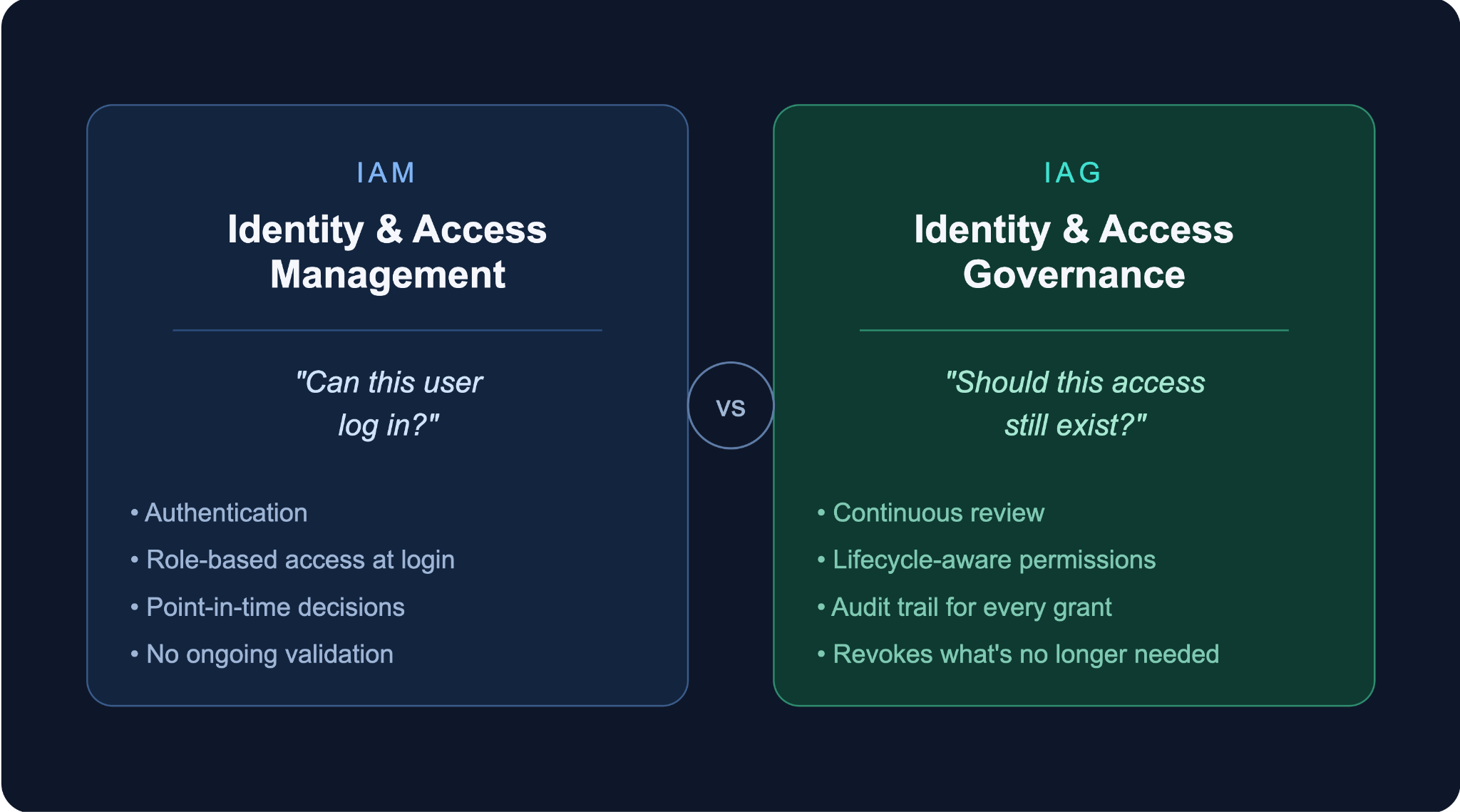
On the face of it, identity and access governance (IAG) and identity and access management (IAM) platforms seem like they serve the same purpose, but they don’t. They’re built for different workflows entirely.
IAM platforms focus on authentication and access control. To put it simply, the job of an IAM platform is to determine whether a person can access the system or not. They only manage the login capabilities of users and what resources they can access based on the assigned role. That’s it. IAM platforms do not run continuous audits on whether the access permissions provided to a user are still relevant or not.
Identity and Access Governance (IAG) platforms, on the other hand, are built to fulfill the gap left by IAM platforms. It works to continuously review and monitor the ongoing validity of any access given to users. It keeps track of who granted the access and whether it is still needed by the user or not. It even tracks when the permissions should be removed. To put it simply, IAG platforms maintain a proper chain of record for every permission that’s shared, and as a result, it helps implement the least privilege principles across teams. It answers one simple question: “Should this user have the particular access at all?”
Here’s an example to make sense of this distinction: An employee was given admin access to Jira for a temporary project six months ago.
- Even after six months, IAM platforms will continue to authenticate the employee and allow access every day because the permissions exist
- IAG platforms, on the other hand, will identify that a project has ended and question whether the elevated access is still required. It will launch a review and a revocation process for the permissions, if required.
What Identity and Access Management Governance Covers in a SaaS Environment
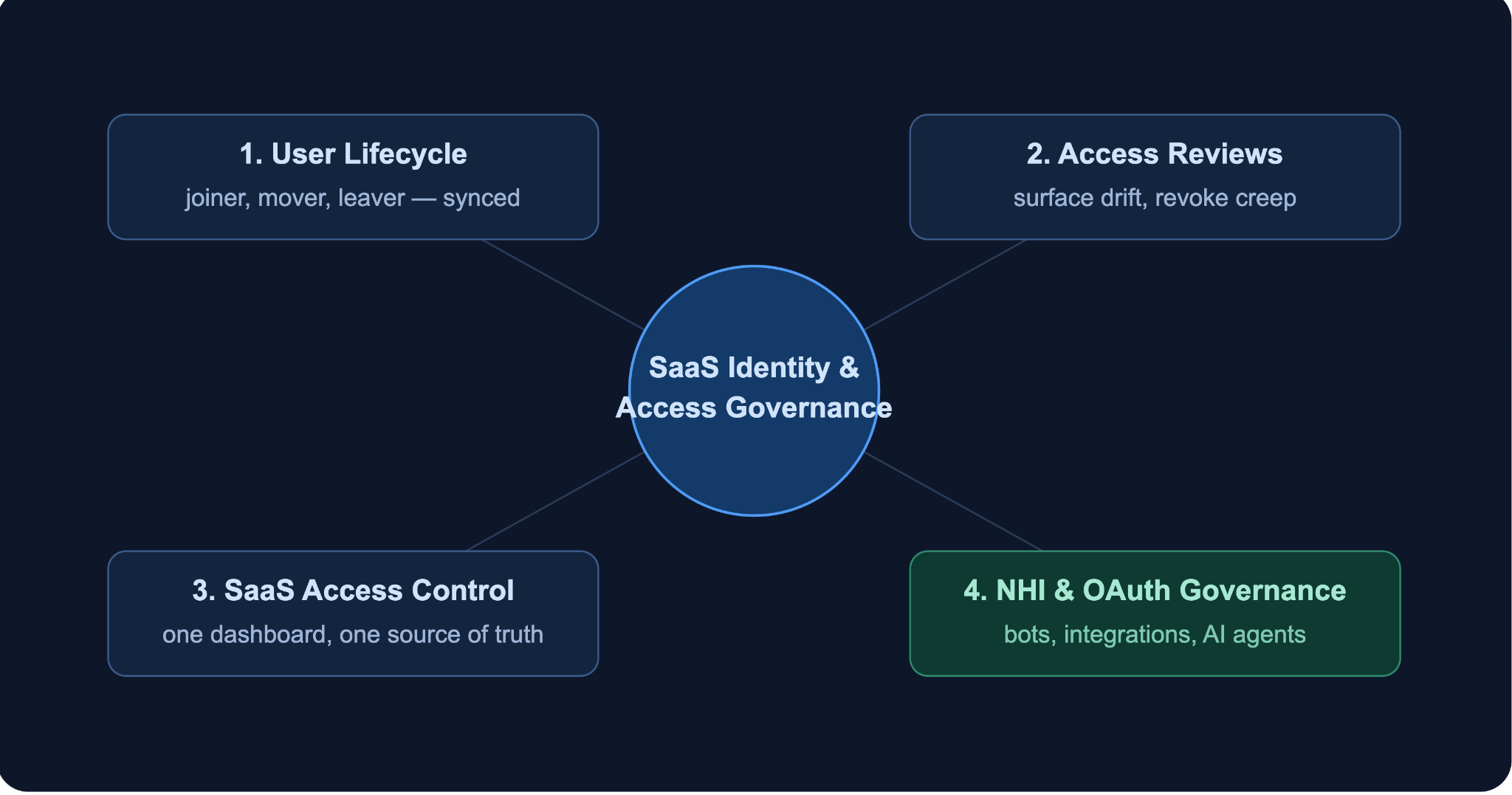
SaaS environments are expansive, and identity access governance extends far beyond a central directory in these environments. From Google Workspace, Entra ID, Slack, Jira, Zoom, and plenty of other applications to name, access is spread across different platforms. Each of these platforms requires separate access reviews because they hold their own users, permissions, and integrations.
Without the right call, it can hamper the operational efficiency of your team if suddenly some of them are logged out without reason by the identity governance system. So, effective identity and access management governance must ensure that access remains consistent and appropriate across the entire ecosystem. So, to help you understand better, here’s what identity access governance covers in a SaaS environment.
1. User Lifecycle Management (Joiner-Mover-Leaver)
User lifecycle management refers to a scenario where access is provided when a user joins, access is updated when their role changes, and access is entirely removed when they leave. This is the gist of it. However, this is easier said than done in SaaS environments. This is because multiple SaaS platforms are used simultaneously in a workflow, and they’re not interconnected. Making a change in the Google Workspace doesn’t necessarily translate to Slack or Jira.
That’s why you need specialised identity access governance platforms like Synk.to, which solves the problem by syncing lifecycle changes across all connected applications, automatically. It can create, update, or remove a user in one system, and the change is translated across the entire SaaS stack in real time. This reduces the risk of orphaned accounts.
2. Access Review and Permission Oversight
In SaaS environments, access reviews help organizations verify the necessity of the current permissions offered to a user. Without regular reviews, permissions tend to accumulate as users move between teams, projects, and roles.
Synk.to functions as a preventive identity access governance platform, helping teams review user access across platforms and connected SaaS applications. This process helps ensure that users maintain an appropriate level of access at all times.
Regular reviews also surface active, deactivated, dormant, and unmanaged users from a single interface. This makes permission drift easier to identify and correct.
3. SaaS Access Control: One Source of Truth
Managing permissions across all SaaS platforms can become difficult, especially as SaaS adoption grows across projects. Identity access governance introduces a centralized layer that keeps access aligned with organizational roles and policies.
Synk.to provides a single source of truth for access management. It controls who has control over what without any problems. It allows administrators to govern permissions across their SaaS environment from one dashboard rather than dozens of disconnected admin consoles.
4. Non-Human Identity and OAuth Governance
Service accounts, bots, integrations, browser extensions, automation tools, and now AI agents are all a part of identity access governance purview. However, they are not human entities. And since these tools can function autonomously in many cases, they hold significant access to company data and become a serious breach of security for clients.
Synk.to discovers, monitors, and controls these non-human identities before they become blind spots. Synk.to monitors every OAuth-authorized integration from a browser extension with Drive access to an automation platform connected to Slack or an AI tool approved during a pilot project. All of these integrations are surfaced and made reviewable when you use Synk.to. This is one of the most overlooked areas of identity and access management governance and as such, this is where organizations face great access risks.
The 2026 Problem: Shadow AI is Outpacing Identity Access Governance
Identity and access management governance has become more important ever since the rise of AI agents. In 2026, access risks come less from employees and more from AI tools that connect to company systems every day. Teams independently authorize AI-powered applications, including AI assistants, automation platforms, Copilot extensions, and workflow agents. These tools gain access through OAuth permissions, and they maintain direct access to SaaS applications and corporate data. Each of these integrations practically creates a new identity with its own privileges.
However, these identities are not governed by traditional identity access governance processes. These identities are not registered, and there’s very little information available on who authorized the integration. These identities also rarely come up in access reviews and can retain permissions indefinitely. As a result, this becomes an imminent threat to IT teams and organizations as a whole due to the lack of governance and not knowing how much access these NHIs hold and whether they actually even need it or not.
Synk.to addresses this gap by governing AI agent identities the same way it governs human users. The platform detects and controls shadow AI agents, risky SaaS integrations, and over-permissive OAuth scopes across the Google Workspace and the Microsoft Entra ID environments. Every OAuth-authorized AI tool is surfaced when you use Synk.to and its permissions are mapped. This is done to ensure the permissions of an AI agent can be reviewed alongside human accounts.
To put this into perspective, let’s look at an example. Suppose a marketing employee uses an AI writing assistant tool for work. The tool has read and write access to the corporate Google Drive. Now, if there is no governance, this permission can go unnoticed in the system for months. However, when you use Synk.to, this integration appears in the system's inventory. The permissions held by this integration are made visible, and over-permissive access is flagged. That way, the integrations become part of the organization’s regular access review process.
How Synk.to Delivers Identity and Access Management Governance
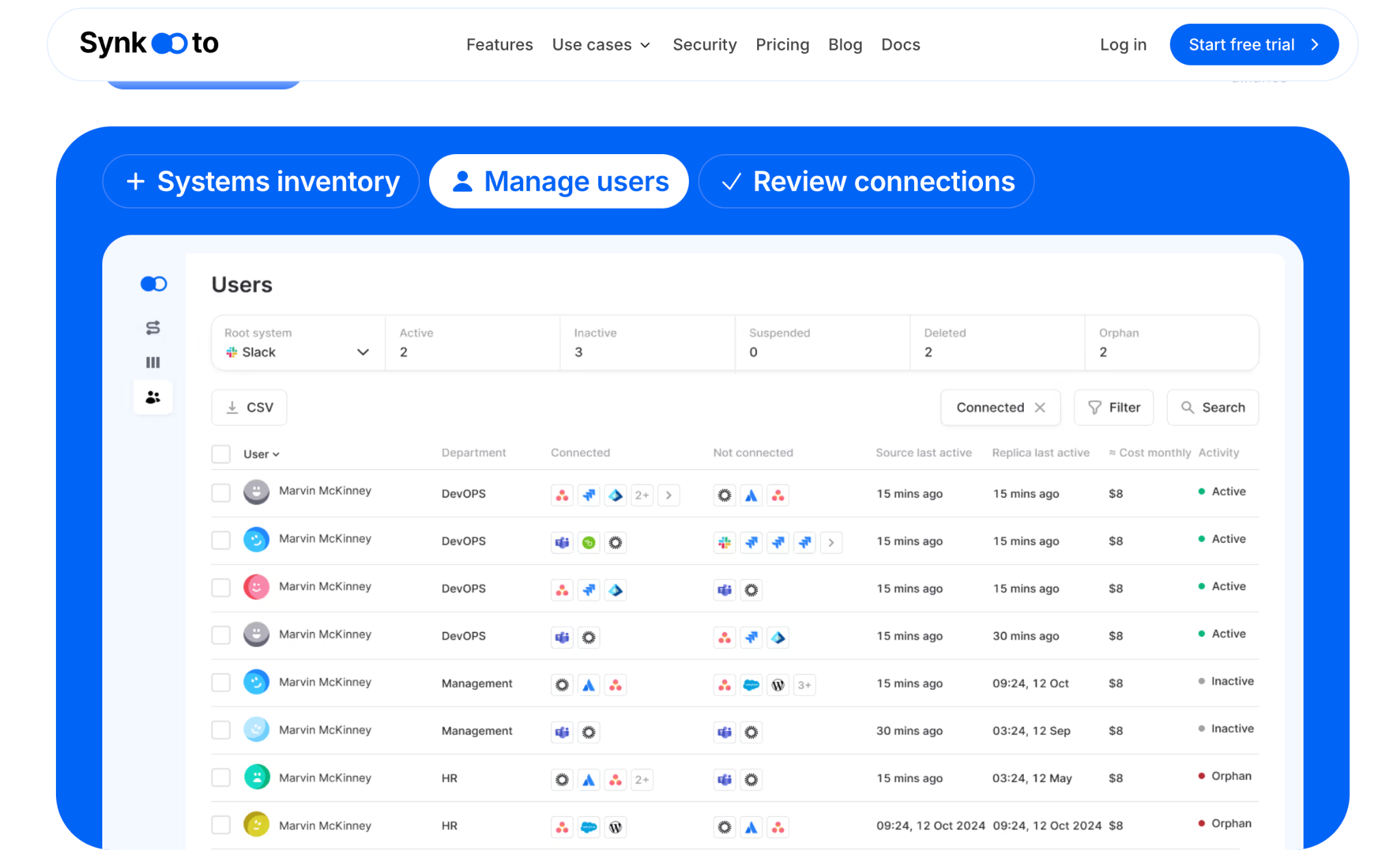
Synk.to stands out as an identity and access management governance platform because of its fast implementation capabilities and its ability to govern both human and non-human entities equally. Here’s a detailed look at how Synk.to delivers identity access governance.
What it governs?
Synk.to governs:
- Human users
- AI agents
- Bots
- Service accounts
- OAuth-authorized SaaS integrations support across Google Workspace and Microsoft Entra ID environments
What the workflow looks like:
- Step 1: Connect your identity platform
- Connect Synk.to to Google Workspace or Microsoft Entra ID using read-only access.
- Setup takes less than five minutes
- No lengthy implementation project required
- Step 2: Build a complete systems inventory
- Once Synk.to is connected, it can start automatically discovering connected SaaS applications
- It can surface all user accounts and identities
- It can identify AI agents and OAuth-authorized integrations
- It can reveal applications and integrations that may have been authorized outside formal IT processes
- Step 3: Define and enforce access rules
- Synk.to, creates rules based on roles, groups, and permission requirements
- It assigns appropriate access policies across connected applications
- It also keeps permissions aligned as users join, change roles, or leave the organization
- Step 4: Run permissions review
- With Synk.to, the next step is to run structured access review campaigns
- These campaigns can identify dormant users and inactive accounts
- It can also surface over-permissive accounts
- It can detect unmanaged identities and AI agents requiring validation
- Lastly, Synk.to can approve permission retention or revoke unnecessary access
- Step 5: Automate provisioning updates
- When you provision updates with Synk.to, it is propagated across all connected applications in real time
- So, it can create, update, or remove users from a connected system
- The changes it makes are automatically reflected across the SaaS environments
- Synk.to also reduces the need for repetitive manual administration
What does Synk.to replace?
Synk.to replaces:
- Spreadsheet-based access tracking
- Manual per-application permission management
- Assumption that onboarding permissions remain appropriate indefinitely
Pricing: $1 per user/month; connects unlimited systems and syncs, unlimited users. Custom pricing is available for enterprise, non-profit, academic, and student use cases.
Security credentials
Synk.to provides the following security credentials as a member of the CSA STAR Registry
- Multi-factor authentication (MFA)
- Role-based permissions
- Session timeouts
- Encrypted backups
- Continuous monitoring
Practical Steps to Build Identity Access Governance for Your SaaS Stack
Building identity and access governance does not require a multi-year transformation project. Instead, it can take barely minutes when you’re using the right platforms and tools. The goal of identity access governance for SaaS stacks is to:
- Build visibility
- Define appropriate access
- And continuously validate permissions to ensure they remain aligned with business requirement
This is how it is made possible in a stepwise process
Step 1: Inventory What You Have
Identity access governance in SaaS stacks starts with visibility because you cannot govern what you cannot see. So, the first step is to identify every identity in your environment. This includes active users, dormant accounts, service accounts, AI agents, and OAuth-authorized integrations.
Synk.to surfaces this inventory immediately after connecting to Google Workspace or Microsoft Entra ID. This provides a consolidated view of identities and connected SaaS applications.
Step 2: Define Who Should Have What Access
To define who should have what access, you need to have solid protocols in place. These protocols will define the access privileges that every user or NHI can hold in a particular role. So, to put your protocols in place, make sure you document the access requirements of each role in your organization. Then define which groups, applications, and permissions are necessary. Once this benchmark is created, the current access levels can be evaluated against this benchmark.
Synk.to uses group-based rules. So, every user in the same role or group has the same level of access privileges. This helps enforce access mappings across connected SaaS tools automatically.
Step 3: Automate Provisioning and Deprovisioning
When a user joins your firm, the software should automatically provision them their accounts and access based on their role. When they leave, their accounts should be immediately deprovisioned. This helps reduce the risk of scope creep and orphaned accounts. Manual access requests and ticket-based workflows create delays and inconsistencies.
Synk.to synchronizes user lifecycle changes across connected SaaS applications in real time. This eliminates the need to manage updates individually in each tool.
Step 4: Run Regular Access Reviews
Governance must be enforced regularly. This helps you keep track of human users, dormant accounts, and NHIs. The recurring schedule also helps you track and identify a lot of useful data for governance purposes, like pointing out permissions on accounts that no longer serve a purpose in line with business interests.
Synk.to’s permission review capabilities surface the complete access picture in one view. It makes it easier to identify anomalies and take action.
Step 5: Govern AI Agents Alongside Human Users
Identity access governance includes governance for AI agents and OAuth-authorized tools. These integrations and agents should be held to the same standard of scrutiny as employee accounts. The key here is determining whether the integrations and agents have access to company systems or not. If they do, they should appear and undergo the same review process.
Synk.to includes AI agents within its governance scope by default. This allows organizations to review and manage human and NHIs in a single workflow.
FAQs
What is the difference between IAM and identity and access management governance?
IAM or Identity and Access Management platforms focus on authentication and access control. To put it simply, they ensure users can log in or not. Identity access governance focuses on whether that access is appropriate over time. Its job is to review, validate, and remove unnecessary access when it is no longer needed.
Does Synk.to work for organizations without an enterprise SaaS plan?
Yes, Synk.to has a flexible use case, and it is designed to help organizations manage identities and access across their SaaS environments. It is not dependent on and doesn’t require enterprise-tier plans for every connected application. The centralized visibility offered by Synk.to, along with its user lifecycle management process, access reviews, and identity governance capabilities are not dependent on enterprise SaaS plans.
How long does it take to get governance visibility with Synk.to?
Most organizations can gain visibility within minutes. This is a crucial benefit as Synk.to only requires read-only access to your Google Workspace or Microsoft Entra ID. Synk.to automatically builds an inventory of users, SaaS applications, AI agents, service accounts, and OAuth-authorized integrations. The read-only access allows users to set up Synk.to, in less than five minutes and get started identifying access risks and governance gaps immediately.