Google Apps Script Is Shadow IT You Can't See: How to Audit and Control It
Every Apps Script project your employees write is a self-issued OAuth app with Gmail and Drive access. Here's how it's been abused, and how to audit and control it.


Every Google Apps Script project your employees write is, functionally, an OAuth app — it requests scopes, it can read Gmail and Drive, and it keeps running on triggers long after the person who built it forgets it exists. Unlike a third-party SaaS tool, though, it never shows up in a "connected apps" inventory, because it isn't a vendor. It's first-party Google surface, built by your own users, hiding in plain sight. With Google just making Apps Script a Workspace core service — an explicit invitation for orgs that disabled it to turn it back on — this is the moment to treat it as what it actually is: an OAuth-scoped application category most shadow IT and identity tools never look at.
- On June 23, 2026, Google made Apps Script a Google Workspace core service, explicitly telling organizations that disabled it over compliance or security concerns that they can now turn it back on.
- Every Apps Script project requests OAuth scopes just like a third-party app — including Gmail and Drive access — and a single authorization token can be reused indefinitely without further user interaction.
- Security researchers have repeatedly documented Apps Script abused in the wild: phishing pages hosted on the trusted
script.google.comdomain, malicious scripts that mine Gmail and Drive for credentials and exfiltrate them by email, and payment-skimming code on e-commerce sites that funnels stolen card data through an Apps Script endpoint. - Google's native admin controls (OAuth scope restriction, Drive log events, the Apps Script Dashboard) can catch this — but only if an admin already knows to go looking. None of them proactively rank Apps Script projects as part of a single OAuth risk inventory.
- Because it's first-party Google surface rather than a connected third-party vendor, Apps Script is one of the most overlooked shadow IT categories — and it needs to be audited with the same rigor as any OAuth-connected app.
Google Just Made Apps Script a Core Service
On June 23, 2026, Google announced that Google Apps Script is officially a Google Workspace core service, now covered under the same Google Cloud and Workspace for Education terms of service as other core products, with "the same enterprise-grade data protection, robust administrative controls, and standard technical support that safeguards other core services."
The practical message to IT and security teams is direct: "If you turned Apps Script off due to compliance, security, or support concerns, you can now enable the service to provide secure, custom automation for your users." Organizations that already had it enabled don't need to do anything — the new protections apply automatically. But "core service" status changes Apps Script's compliance and support posture; it doesn't change the underlying identity risk. That risk was already there, and it's about to get more exposure surface as more orgs turn the service back on.
Why Every Apps Script Project Is a Self-Issued OAuth App
Strip away the "it's just a script" framing and look at what actually happens when someone writes and runs an Apps Script project: they authorize it to act on their behalf, and that authorization is an OAuth grant like any other.
- It requests scopes. A script that reads Sheets, sends email as the user, or searches Drive is requesting the same categories of OAuth scopes — including high-risk ones like Gmail and Drive access — that a third-party app would need to ask for through a consent screen.
- The authorization is durable. Once a user authorizes a script, the resulting token can be reused repeatedly without any further prompt — the same standing-access problem that makes malicious third-party OAuth grants dangerous.
- It runs on triggers with the creator's permissions. Installable triggers execute with the authority of whoever created them, which means a script built by a departed employee, or one built under a high-privilege account "just to get something done," keeps running with that person's access.
- It doesn't look like a third-party app. Because Apps Script is a first-party Google feature, it doesn't appear in most OAuth/shadow-IT inventories the way a connected vendor app does — even though the access pattern is identical.
How Apps Script Has Actually Been Abused
This isn't a theoretical risk. Security researchers have documented Apps Script used as an attack vector for years, precisely because it inherits the trust of Google's own domains:
- Credential phishing hosted on Google's own domain. Cofense researchers documented threat actors building fake login pages as Apps Script web apps, hosted on
script.google.com. Victims who enter credentials have them exfiltrated via a hidden request, then get redirected to the real service to avoid suspicion. Becausescript.google.comsits on the allowlist of most security products, "hosting the phishing page within Google's trusted environment creates an illusion of authenticity" (BleepingComputer). Attackers can also update the script remotely without ever sending a new link. - Gmail and Drive data mining via a single OAuth token. Analysis of a malicious Apps Script project found it requested OAuth scopes covering profile data, email actions, and calendar access — authorized once, then reused indefinitely. The script used dedicated functions to search Drive and Gmail for keyword patterns like "project" and "pass:", then exfiltrated matching content by email to a temporary address, with its search parameters fetched remotely from a Pastebin file so operators could retarget it on the fly (own.security).
- Payment-card skimming through a trusted Google endpoint. Researchers at Sansec found obfuscated e-commerce checkout code that captured payment form data and routed it through a Google Apps Script endpoint (
script.google.com/macros/...) to an attacker-controlled server — specifically to "evade malware scanners and trust controls like CSP" that would normally block requests to an unfamiliar domain (Sansec). Web-skimming as a category has only grown since — 2026 reporting has tracked Magecart-style e-skimming infections across thousands of e-commerce domains, a multiple of 2023 levels.
The common thread across all three: the attack works because it's running on infrastructure everyone already trusts, requested through an authorization flow everyone already ignores.
The Native Google Workspace Controls (and Where They Stop)
Google gives admins real tools here — they're just opt-in and scattered across several places, not a single risk-ranked view:
- Turn Apps Script on or off organization-wide from the Admin console, or disable an individual project by deleting its associated Cloud project.
- Restrict high-risk OAuth scopes for Gmail and Drive so that only explicitly trusted apps — including internally-built scripts — can request them, via the Investigation Tool (Security → Security Center → Investigation Tool) filtered to OAuth log events.
- Alert on new scope grants. Admins can create activity rules that notify them the moment someone authorizes a specific scope, rather than discovering it during a periodic review.
- Audit script activity via Reporting → Audit and investigation → Drive log events, filtered by document type "Google Script," to see what actions were taken on a given project and by whom.
- Restrict external domains Apps Script can reach through its URL Fetch Service (Business Plus, Enterprise, and Education tiers), and review Admin SDK Reports for custom usage analytics across the org.
Two limits matter more than the tooling itself. First, Google's own documentation notes that "after you revoke access to a scope, users can re-grant access" — revocation is a point-in-time action, not a durable policy, unless it's paired with ongoing monitoring. Second, and more fundamentally: none of these controls proactively tell you that a new, high-scope Apps Script project exists. Every one of them requires an admin to already suspect something and go looking in the right console. There's no single inventory that ranks an Apps Script project needing Gmail send-as and Drive-wide access next to a third-party app requesting the same scopes — even though, from a risk standpoint, they're the same category of thing.
A Practical Governance Checklist
- Limit who can create and run scripts. Restrict Apps Script access to specific users or groups who have an approved use case, rather than leaving it on for everyone by default.
- Restrict and trust-list high-risk scopes. Require explicit admin trust before any script — internal or third-party — can request Gmail or Drive-level access.
- Review installable triggers and who owns them. A trigger runs with its creator's privileges; audit for scripts created under high-privilege or departed-employee accounts and rebuild them under service accounts where possible.
- Get secrets out of the script body. Hardcoded API keys and credentials in Apps Script source are a common, avoidable failure — use Properties Service for configuration and Secret Manager for anything sensitive.
- Declare scopes explicitly. Set scopes deliberately in the project's
appsscript.jsonmanifest rather than relying on auto-detected defaults, which tend to over-request. - Require Advanced Protection and 2FA for accounts that can authorize third-party and script-based OAuth access.
- Monitor continuously, not just at audit time. Alert on new OAuth scope grants and review Drive log events for script activity on a recurring cadence, not only when something looks wrong.
How Synk.to Would Surface This
The gap in every native control above is the same gap that lets malicious third-party OAuth apps go unnoticed: detection depends on an admin manually checking the right console. Synk.to closes that gap by treating every OAuth-scoped system connected to Google Workspace the same way — whether it's a SaaS vendor's app or a script an employee built themselves.
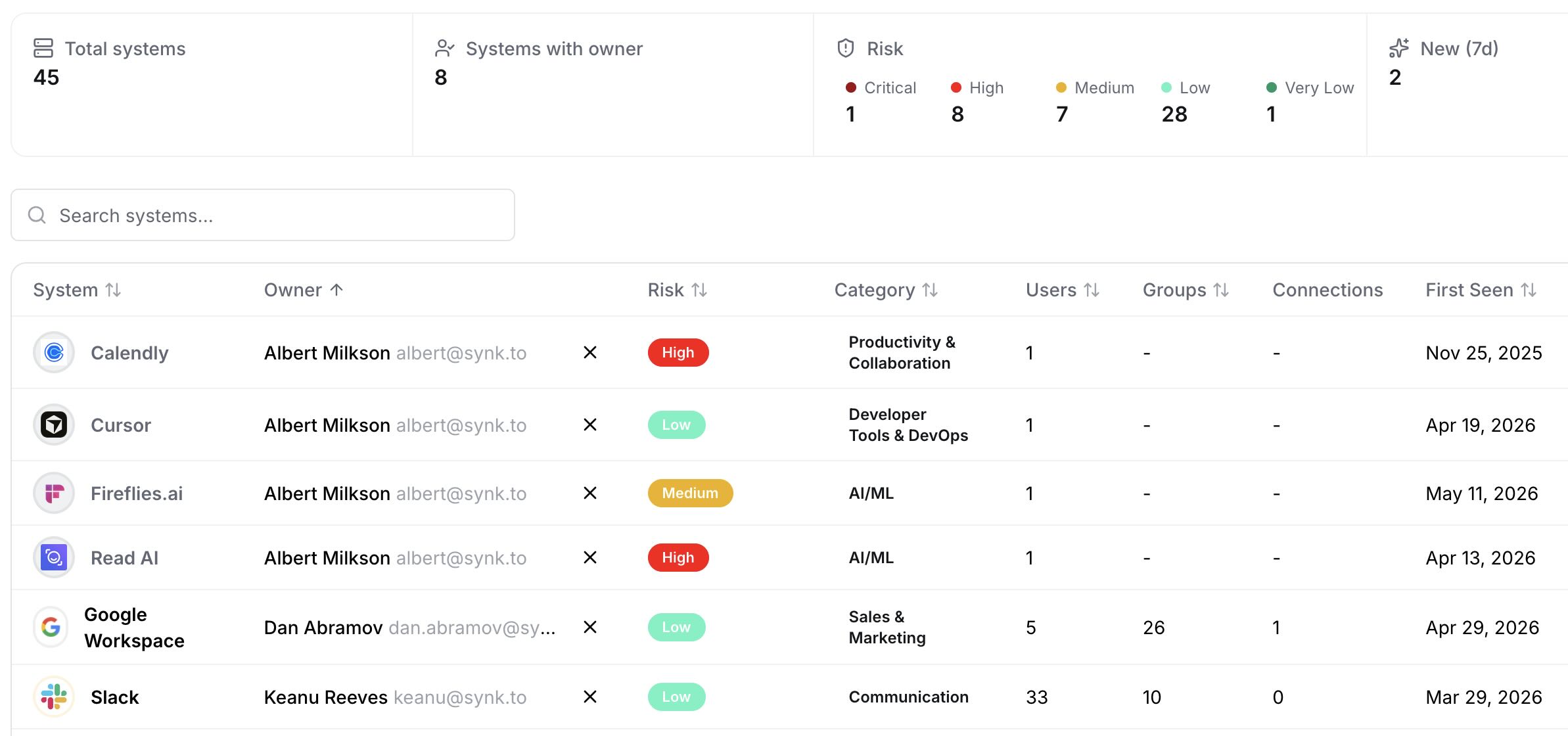
Synk's system catalog gives you a single, continuously updated inventory of everything with OAuth-level access to your identity provider, with risk level, owner, and scopes granted in one view — so a newly-authorized script requesting Gmail or Drive access shows up ranked next to every other connected system, instead of requiring a separate trip into the Apps Script Dashboard or Drive log events:
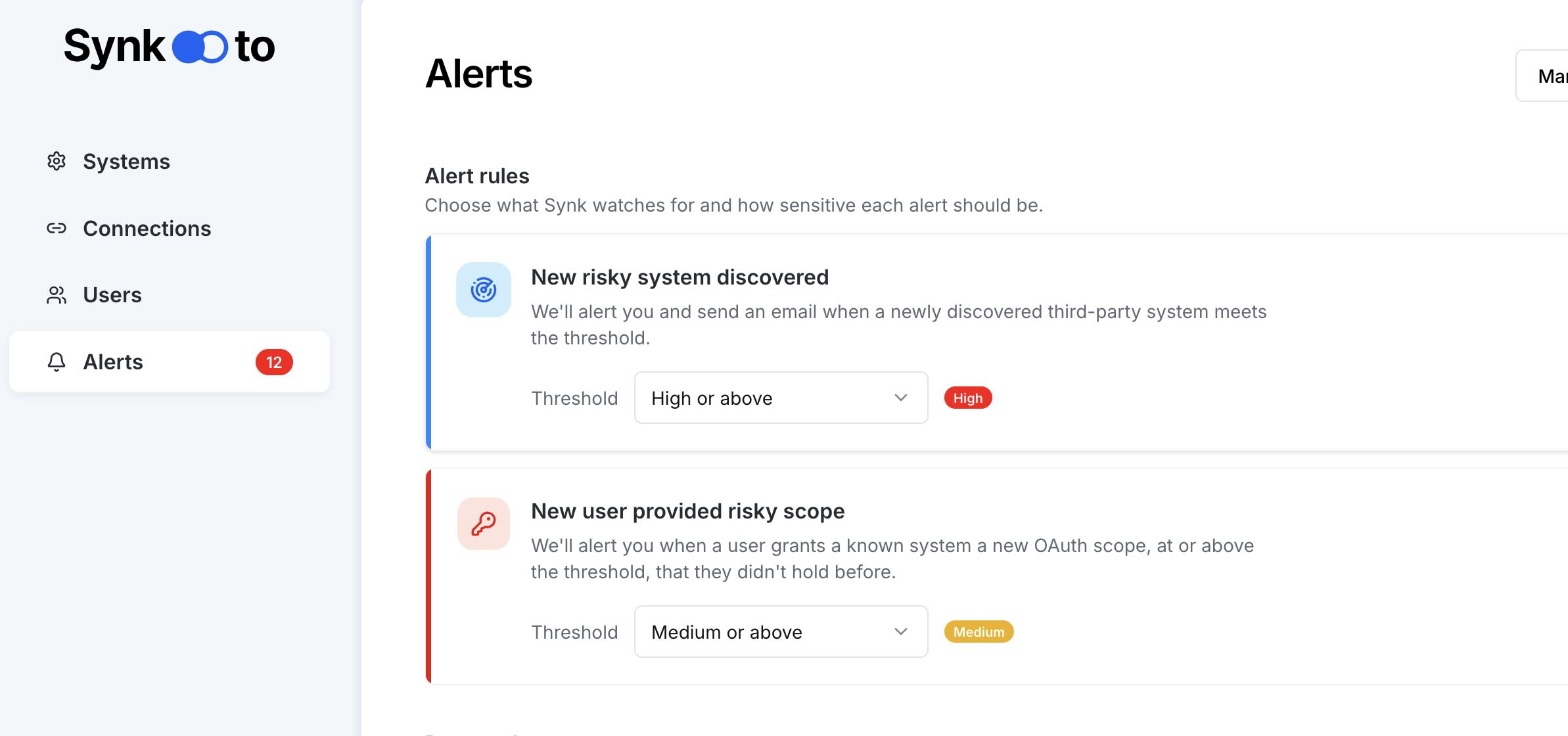
And because the risk isn't the one-time authorization but the standing access it creates, Synk's alert rules fire the moment a new system appears or a user grants a broader scope than they've held before — the exact moment a high-privilege Apps Script project would otherwise slip by unnoticed until the next manual review:
That means the same governance question — "what just got Gmail or Drive access, and who authorized it?" — gets answered continuously and in one place, whether the answer is a third-party AI tool, a malicious OAuth app, or a script one of your own employees wrote last quarter and forgot about. Start free.
FAQs
What is Google Apps Script and why is it a security risk?
Google Apps Script is a cloud-based JavaScript platform for automating and extending Google Workspace apps like Sheets, Docs, Gmail, and Drive. It's a security consideration because every script a user authorizes requests OAuth scopes just like a third-party app — including sensitive Gmail and Drive access — and that authorization persists indefinitely, running on triggers with the creator's own permissions, without appearing in most third-party app inventories.
Does Google Apps Script's new "core service" status make it safer?
It improves Apps Script's compliance coverage, administrative controls, and support tier by bringing it under the same terms of service as other Workspace core products. It doesn't change the underlying identity risk: scripts still request OAuth scopes and run with standing access. If anything, it increases exposure, since Google is explicitly encouraging organizations that previously disabled Apps Script to turn it back on.
Can Google Apps Script access Gmail and Drive data?
Yes. A script can request OAuth scopes covering Gmail (reading, sending, or modifying settings) and Drive (searching, reading, or sharing files), the same categories of high-risk scopes a third-party app would need. Security researchers have documented malicious scripts that use exactly this access to search Gmail and Drive for sensitive keywords and exfiltrate matches.
How do attackers actually abuse Google Apps Script?
Documented cases include phishing pages hosted as Apps Script web apps on the trusted script.google.com domain to evade security allowlists, malicious scripts that mine Gmail and Drive for credentials and data using a single reusable OAuth token, and payment-skimming code on e-commerce sites that exfiltrates stolen card data through a Google Apps Script endpoint to bypass domain-trust controls like CSP.
How do I audit which Apps Script projects exist in my Google Workspace?
Use the Admin console's usage metrics for a high-level view, Reporting → Audit and investigation → Drive log events (filtered to document type "Google Script") for project-level activity, the Investigation Tool for OAuth scope grants, and the Apps Script Dashboard for per-project details including requested scopes and execution logs. Continuous OAuth monitoring closes the gap between these separate views.
Can I restrict or disable Google Apps Script for my organization?
Yes. Admins can turn Apps Script on or off organization-wide, disable individual projects by deleting their associated Cloud project, restrict which high-risk OAuth scopes can be requested and by which trusted apps, and limit which external domains a script can reach through its URL Fetch Service.
How does Synk.to help govern Google Apps Script risk?
Synk.to connects to Google Workspace via OAuth and inventories every system with OAuth-level access — including Apps Script projects — in one risk-ranked catalog, alongside third-party SaaS and AI tools. It alerts the moment a new system appears or a risky scope like Gmail or Drive access is granted, so a self-authorized script gets the same scrutiny as any third-party OAuth app, instead of requiring a manual trip through the Apps Script Dashboard. Start free.